
Deposit Not Showing Up?
What to check when a crypto deposit hasn't been credited to your ChessBit balance yet.
First: Detected vs. Credited
ChessBit notifies you twice: once when your deposit is detected on-chain (usually within a minute of broadcast), and again when it's credited after enough network confirmations. Seeing "detected" means everything is working; the network just hasn't confirmed it yet.
Check Your Deposit History
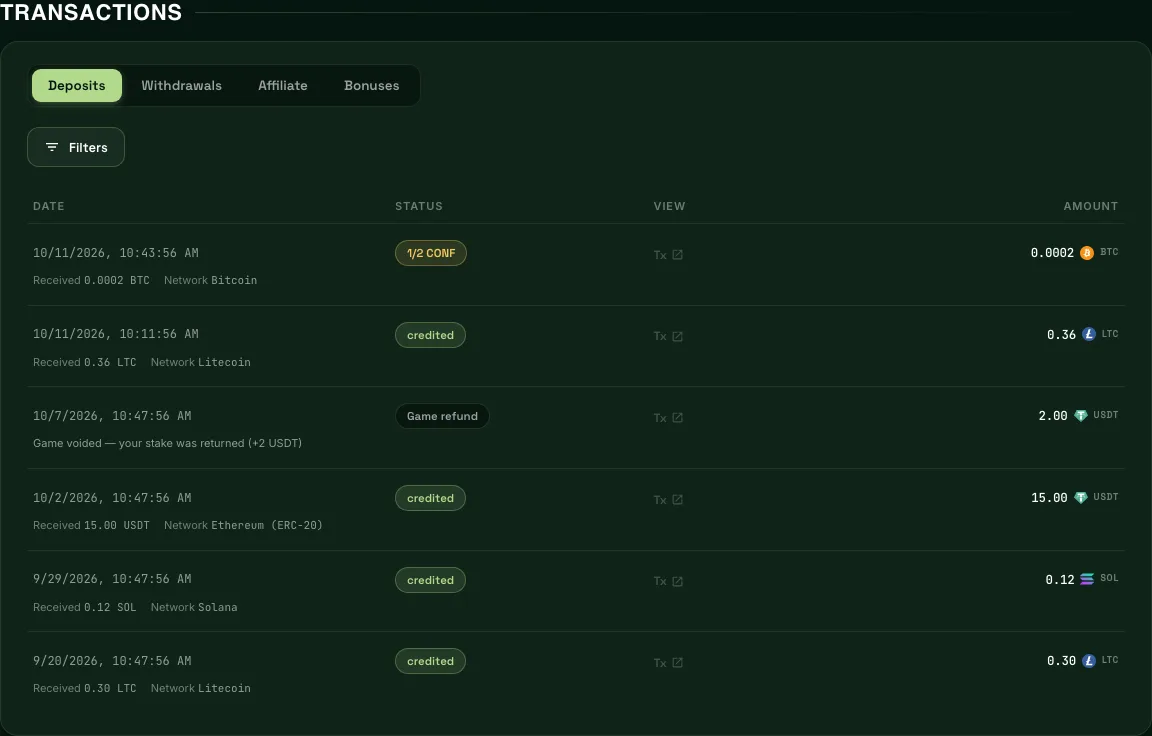
Open the profile menu → Transactions → Deposits. Each deposit shows its status: confirmations so far while it's pending (for example 4/12 CONF), then credited, or Held / Refunded if something needs attention. The list refreshes itself while anything is pending.
Check the Transaction On-Chain
Look up your transaction ID on the network's explorer:
| Network | Explorer |
|---|---|
| Bitcoin | mempool.space |
| Litecoin | litecoinspace.org |
| Ethereum (ETH, USDT, USDC) | etherscan.io |
| BNB Smart Chain | bscscan.com |
| Tron | tronscan.org |
| Solana | solscan.io |
If the transaction isn't on the explorer, it never left your wallet or exchange. Check there first.
How Many Confirmations Are Needed
| Network | Confirmations | Typical wait |
|---|---|---|
| Bitcoin, Litecoin | 3 | ~10–30 min |
| Ethereum, BNB Smart Chain, Tron | 12 | ~1–3 min |
| Solana | 32 | ~1 min |
During network congestion these can take noticeably longer; that's the chain, not ChessBit.
Common Reasons a Deposit Is Held Instead of Credited
- Below the $5 minimum — held, not lost; support can credit or return it.
- Above the $10,000 single-deposit ceiling — held for a manual check.
- Over your verification level's deposit limit — complete the next level to release it.
- Compliance review — occasionally a deposit gets a manual look; you'll see it as pending.
When to Contact Support
If the explorer shows enough confirmations and 30 minutes have passed with no credit, contact us on Discord or at support@chessbit.io with:
- Your username
- The coin and network
- The transaction ID (TXID)
- The amount and approximate time sent
Never share your seed phrase or private keys with anyone — support will never ask for them. We only ever need the public transaction ID.