
Auto-Join: Let Matching Games Come to You
Set your stake range, time controls and compatibility once and ChessBit offers every open game that fits. How Auto-Join works, how long it runs, how to accept.
Updated 2026-10-112 min readChessBit Support
Auto-Join watches the lobby for you. You describe the games you're happy to play, and whenever a new open game matches, ChessBit offers it to you straight away. You don't have to keep refreshing the lobby.
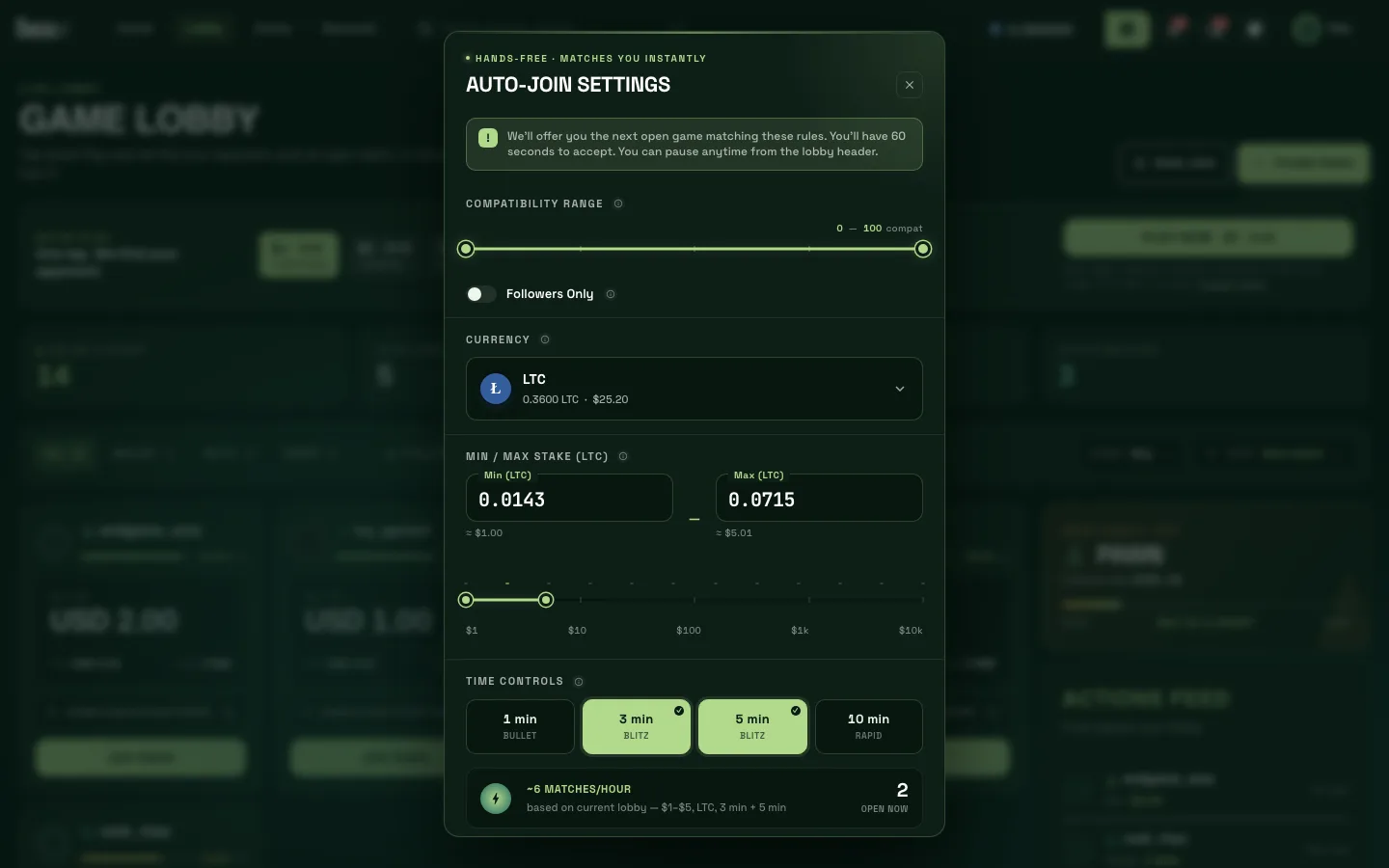
Setting It Up
- In the Lobby, press Auto-Join.
- Set the Compatibility Range you'll accept (0–100).
- Turn on Followers Only to be offered only games posted by players you follow.
- Choose the Currency you'll stake.
- Enter a Min / Max Stake. The minimum is $1, and your balance must cover the maximum.
- Pick one or more Time Controls: 1, 3, 5 or 10 minutes.
- Check the estimate (matches per hour, and how many open games fit right now), then press Enable Auto-Join.
What Happens Next
- Auto-Join runs for 10 minutes. A bar at the top of the screen shows Auto-join active with the time left and a Cancel button.
- When a matching open game appears, you get a Suitable game found offer with a 60-second countdown. Press Accept to go to the board, or Decline to keep waiting.
- Nothing is joined without your Accept, and your stake isn't touched until you accept.
To change your settings, use Edit in the lobby header. To stop early, press Cancel on the bar, or Auto-Join On — Disable in the lobby header.
Good to Know
- Auto-Join only looks at open games in the lobby. Quick Play games are matched separately and never offered to Auto-Join.
- The usual limits apply: one staked game at a time, and stakes within your verification level.
- The Auto-join queue counter in the lobby shows how many players have Auto-Join running.
Your answer tells us which articles to rewrite first.
Next in Playing Games
PlayQuick Play: Get Matched in One TapHow Quick Play works: pick a stake and clock, tap Play Now and the server finds an opponent at the same stake. Pools, coins, cancelling and timeouts explained.PlayFinding a Game in the LobbyA tour of the ChessBit game lobby: open games, the compatibility score, fees, filters by time control and stake, sorting, and joining a game.PlayCreating a Game & Challenging a FriendPost your own open game with your stake, clock and compatibility range, or send a private challenge to a specific player. All the options and rules.