
Direct Messages (DMs) & Your Inbox
Send private messages on ChessBit: start a conversation, quick replies, read receipts, inbox search, removing conversations and who can message you.
Direct messages are private one-to-one conversations with other players: arrange a rematch, say good game, or talk chess.
Opening Your Inbox
- The Messages icon in the top bar opens a quick list of recent conversations, with New message, Search messages… and View all. A red badge shows how many unread messages you have.
- View all (or DMs in the phone's bottom bar) opens the full Messages page.
Starting a Conversation
- In the inbox, press + (new message) and search for the player's username.
- Or open a player's profile and press Message. You can also start one from someone's profile card (click their name in chat or the lobby) or from your followers and following lists.
In a Conversation
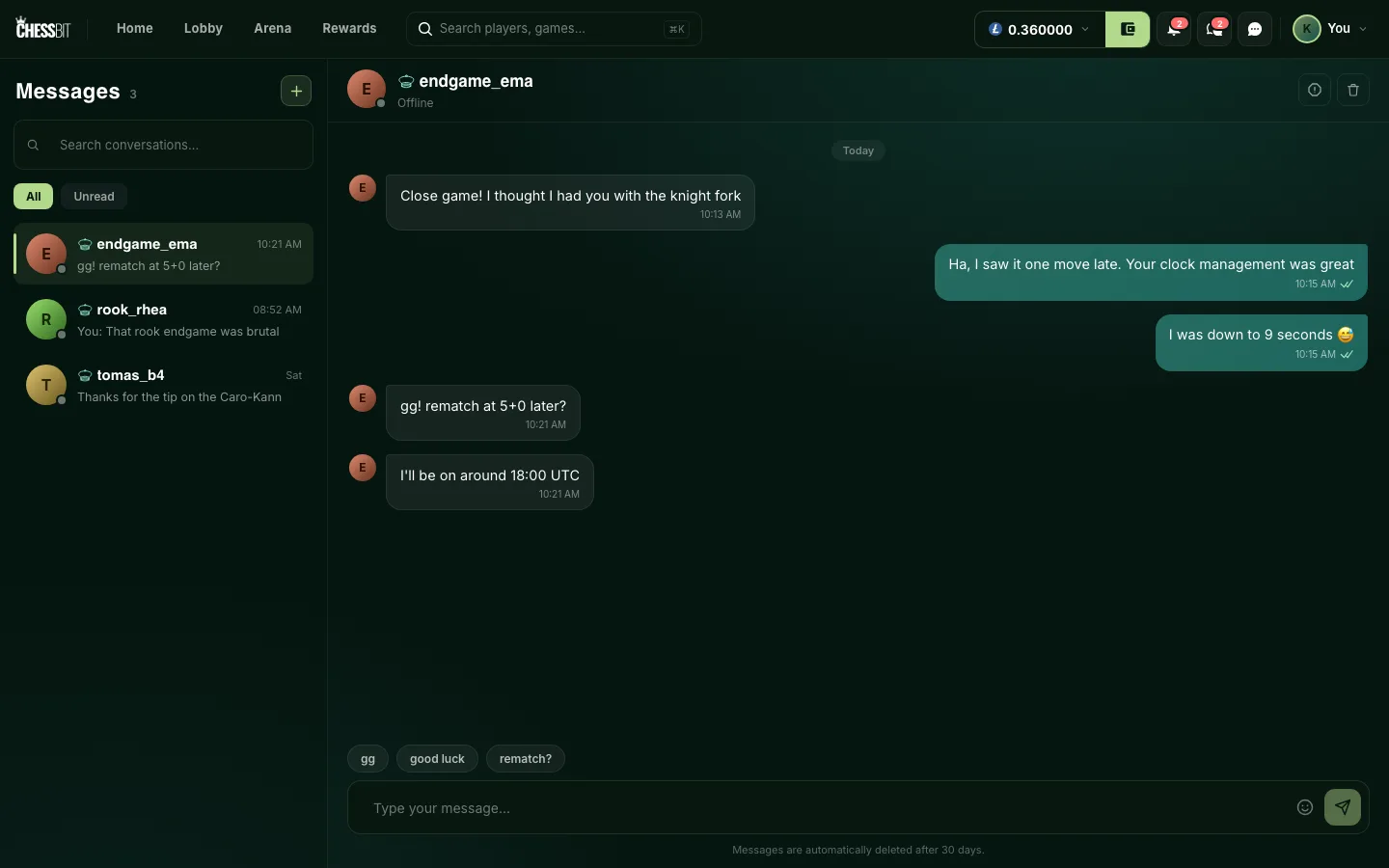
- Online / Offline · last seen… under the name shows whether they're around.
- Typing dots appear while the other player is writing.
- Read ticks: one tick means sent, two mean they've read it.
- A message can be up to 5,000 characters.
- Quick replies above the message box:
gg,good luckandrematch?. - The emoji button adds emoji.
On the inbox list you can search conversations by username and switch between All and Unread.
Removing a Conversation
The bin icon at the top of a conversation (Remove conversation) removes it from your inbox. The other player keeps their copy.
Messages are automatically deleted after 30 days, for both players. There's no way to restore them, so screenshot anything you need to keep, such as a report you want to send us.
Who Can Message You
- Turn off Allow direct messages in Privacy settings and nobody can message you, in new or existing conversations. Anyone who tries sees "This user has disabled DMs". Your old conversations stay readable, and you can still message others, but they can't reply while the switch is off.
- Block a player from their profile page and messages stop in both directions, including in the conversation you already have: it disappears from both inboxes and neither of you can send. They see "This user blocked you"; you see "You blocked this user. Unblock them to send a message." Blocking also removes any follow between you. See Following, profiles & blocking.
Reporting a Player
Use the Report player icon at the top of the conversation, or contact us on Discord or at support@chessbit.io with the username. ChessBit staff will never ask for your login code, your 2FA codes or your withdrawal code in a DM. Anyone who does is not us; report them.