
Following Players, Profiles & Blocking
Follow other ChessBit players to see their results, open their profile to message or challenge them, and mute or block anyone you'd rather not hear from.
Player Profiles
Click any username (in chat, the lobby, search results or your followers list) to open that player's profile card. From the card you can:
- Challenge them. This opens Create Game on the Private Challenge tab with them already selected.
- DM them.
- Follow or Unfollow them.
The card also shows their compatibility with you in Bullet, Blitz and Rapid, and their stats, unless they've hidden them ("This user's statistics are hidden.").
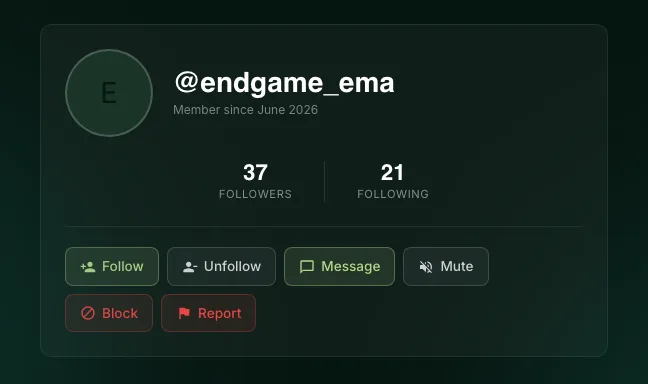
Each player also has a full profile page at app.chessbit.io/profile/<username>, showing their Followers and Following counts, when they joined, and the buttons Follow / Unfollow, Message, Mute, Block / Unblock and Report.
Finding Players
Use the search box in the top bar (Search players, games…). Results have a Challenge button, and your last five searches are kept under Recent on your device.
Following
Following someone:
- puts their wins, losses and streaks in the Actions feed in the lobby;
- lets you filter the lobby to Following to see only their open games;
- lets you join their games marked Followers only, and lets your Auto-Join pick their games when you set it to Followers Only.
Your Followers and Following lists are on your profile. Each entry has quick actions: Challenge, Direct Message, Follow back, Unfollow and, for followers, Remove follower.
Don't want followers? Turn off Allow follow in Privacy settings. This stops new follows and removes all your existing followers.
Muting
Mute (on the profile page, or /mute @username in chat) hides a player's messages from your general chat. It doesn't stop them messaging you directly or challenging you. More in Using the general chat.
Blocking
Block on a player's profile page works in both directions:
- Direct messages stop completely, including in a conversation you already have. The conversation disappears from both inboxes and neither of you can send. If they try, they see "This user blocked you"; if you try, you see "You blocked this user. Unblock them to send a message." Typing indicators and read receipts stop too, and old messages still expire after 30 days.
- They can't open your profile ("This user has blocked you") or see your stats.
- Any follow between you is removed, in both directions.
Use Unblock on the same page to undo it. That lets you message each other again, but it doesn't bring the follows back. Older messages return to your inbox when you start the conversation again with Message, as long as they're under 30 days old.
If someone is harassing you, block them and report them so our team can act. See Direct messages.