
Your First Staked Game
From new account to first payout: the five steps to playing chess for money on ChessBit, from signing up and verifying to Quick Play and getting paid.
1. Create Your Account
Sign up with an emailed login code or a crypto wallet; see How to create an account. You'll confirm you're 18+, pick a username, and tell us your chess level. That sets your starting rating, so be honest: it makes your first matches fair.
Already rated on Lichess or Chess.com? Link the account to start from a verified rating and a higher new-player stake cap; see Matchmaking & ratings.
2. Complete Level 1 Verification
A short personal-details form, with no documents. It unlocks deposits and stakes up to $100 a game. While your rating settles, a new-player cap also applies: $25 rising to $75, or $50 rising to $250 with a verified chess account. See Verification levels.
3. Deposit
Open the Wallet, pick a coin (BTC, ETH, LTC, SOL, TRX, BNB, USDT or USDC) and send at least $5 to your deposit address. We suggest sending $10, since some exchanges take their fee out of the amount you send. Your balance is credited after network confirmations. See How to deposit.
4. Find a Match
The fastest way is Quick Play: pick a pool (such as $1 · 3+0) and tap Play Now, and the server pairs you with another player at the same stake.
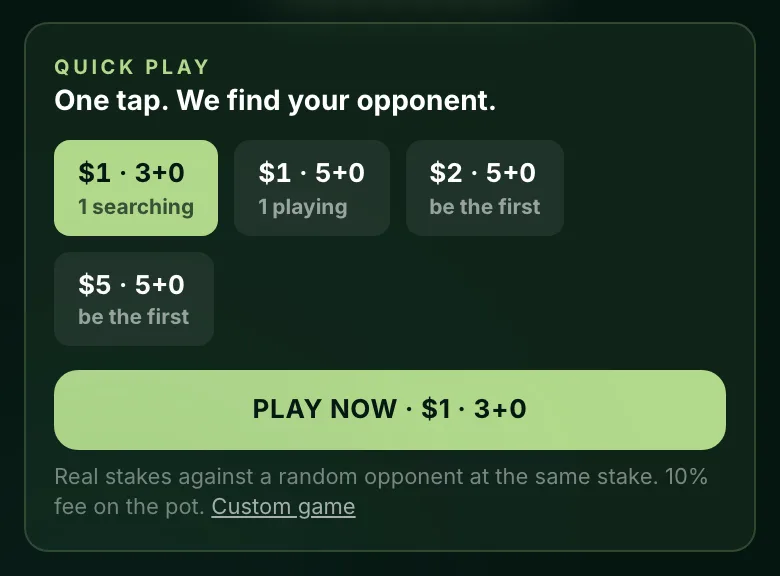
Prefer to choose? Browse open games in the lobby, where a compatibility percentage shows how even each matchup is, create your own game, or turn on Auto-Join to be offered games that fit. Stakes start at $1.
5. Play, and Get Paid
Win, and the pot minus the platform fee is credited once our fair-play system clears the game, usually within minutes (longer at busy times). You'll get a Payout Released notification. What everything on the board does: During a game.
To withdraw, stake each deposit once first; see How to withdraw.
Stay on the game while you play. Your clock keeps running, and if your connection drops (on a phone, switching apps can do that) a reconnect countdown starts. If it runs out, you lose the game. See Connection issues during games.
18+. Not available where prohibited.